TIL: Spotlight can do math and unit conversions
You can open macOS’s Spotlight with cmd + space. Then you can type in math like (4 + 23) * 92 and it will show you the answer. I’ve been using this feature for awhile but I just learned that it can do a lot more than I realized! This came up because I typed 2**256 and it gave me the answer. Interesting…what else can it do?
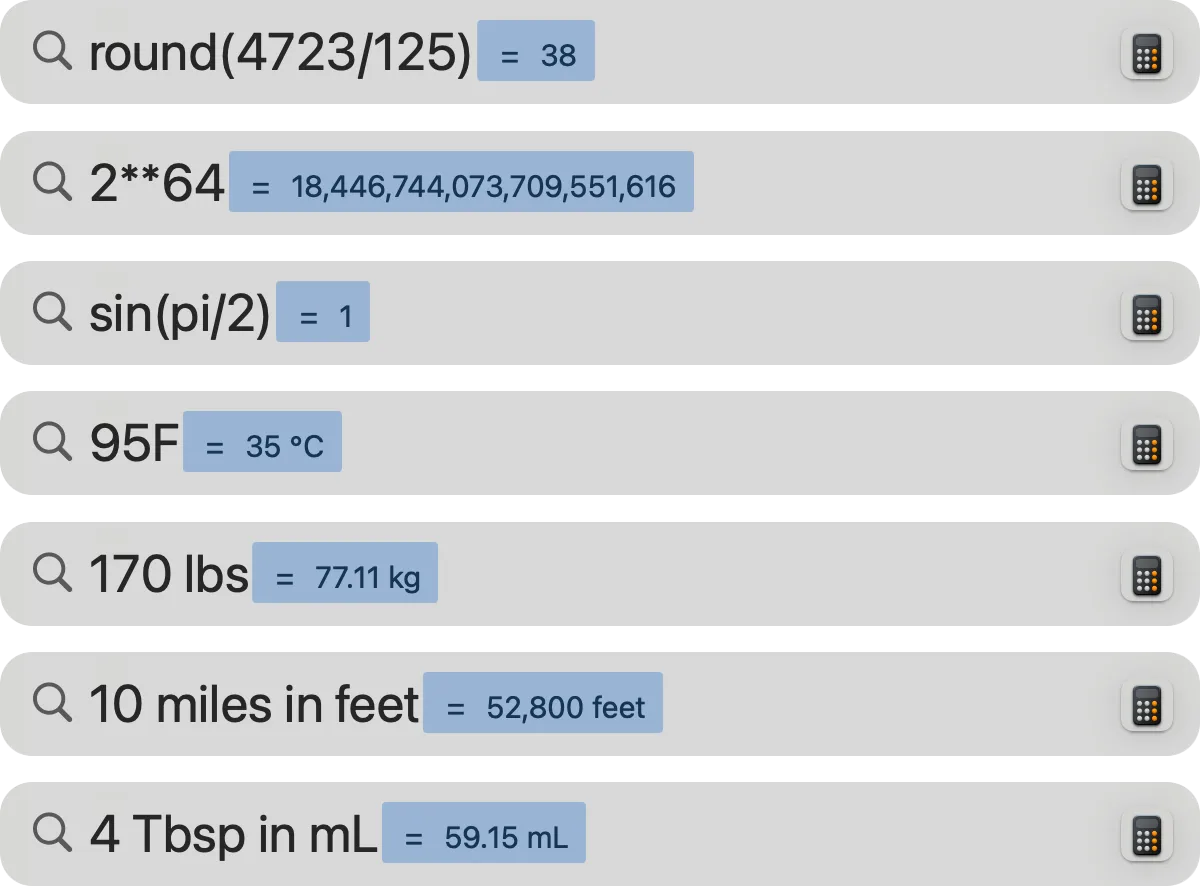
I couldn’t find a comprehensive list of supported features. This Stack Overflow answer has a long list; one other commenter says it’s everything the macOS calculator can do. All of these things work:
- Exponents, written as any of
2**3,3^2, orpow(2, 10) - Factorials, written as
5!orfact(7) - Trigonometry, functions like
sin,cos,tan, and constants likepi. - Lots of other math. You can
round(),pow(),abs(),sqrt(),ceil(),floor(), and more.
The absolutely best part is that it does unit conversions. Historically this is one of the things I have always typed into Google search. I’m sure I’m going to use this all the time now. Type 95F and it tells you that’s 35°C. Type 170 lbs and it says 77 kg. You can specify the output unit like 4 Tbsp in mL or 10 miles in feet (it does not, however, support unhinged unit conversion like “1 mile in furlongs”).
One really nice UX touch is that Spotlight automatically selects the answer, so you can easily copy it with cmd + C without dragging.